Light Show Network Topology
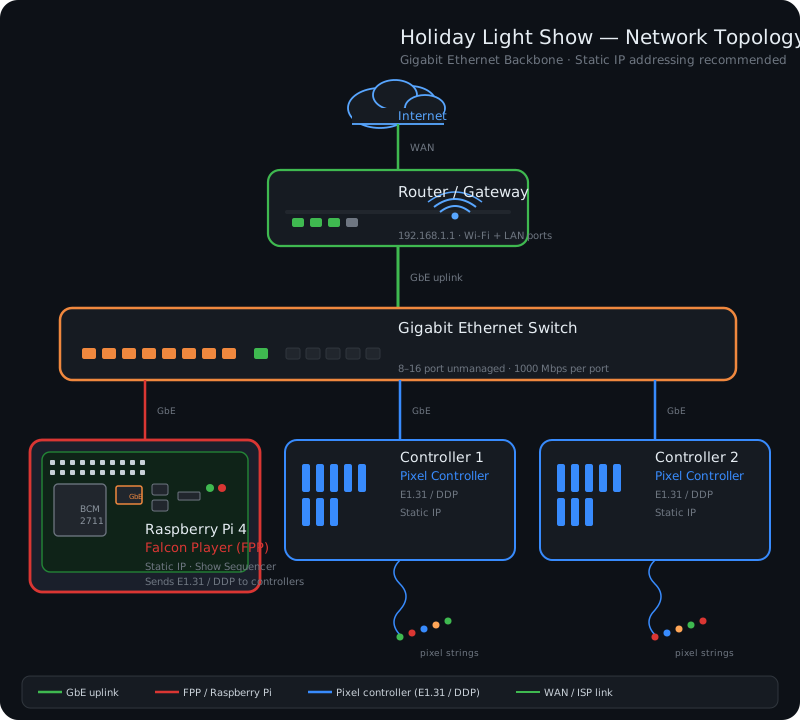
For optimum performance, your show network should look similar to the diagram below
- You want all show devices isolated on ONE gigabit network switch
- No other non-show devices plugged into it, other than your main router
- This ensures that no other network traffic (streaming, gaming, security cameras, etc.) is interfering with or siphoning bandwidth from your show
- The switch will internally handle all traffic between the show devices — typically a Raspberry Pi running Falcon Player (FPP) and the Pixel Controllers (e.g. Falcon, Kulp, Holiday Coro, Twinkly, etc.)
- Everything should be hardwired using cat-6+ ethernet cables, if possible
- If you need to use WiFi for any reason, it is highly recommended that you add a dedicated outdoor WiFi access point that would also be plugged into the gigabit switch
- For recommendations on a gigabit ethernet switch, Raspberry Pi or other hardware mentioned above, please see our shopping list
- For WiFi issues, please see the WiFi troubleshooting guide
- Please note that more than two pixel controllers can be used, and they can be different types — this is for illustration only