Twinkly Master vs. Native xLights Support: Which Should You Use?
If you’ve started experimenting with Twinkly lights and xLights, you’ve probably discovered there are two primary ways to control your lights:
- Using xLights’ built-in Twinkly support
- Using Twinkly Master (developed by John Lord at Lights of Elberfeld)
At first glance they seem to accomplish the same thing—allowing xLights to play sequences on Twinkly lights. However, they work very differently and each has advantages depending on your display.
This guide explains when you should use each approach and why many advanced users still rely on Twinkly Master. If you have already decided to pursue using Twinkly Master, please take a look our Twinkly Master Setup Guide to get started!
What is Twinkly Master?
Twinkly Master is free middleware that sits between xLights and your Twinkly lights. That means it requires a separate computer (Mac or PC) in addition to your FPP computer (Raspberry Pi) to be running during light shows. If you have 100% Twinkly hardware and don’t need all of the FPP features, Twinkly Master is also capable of running and scheduling xLights sequences on its own.
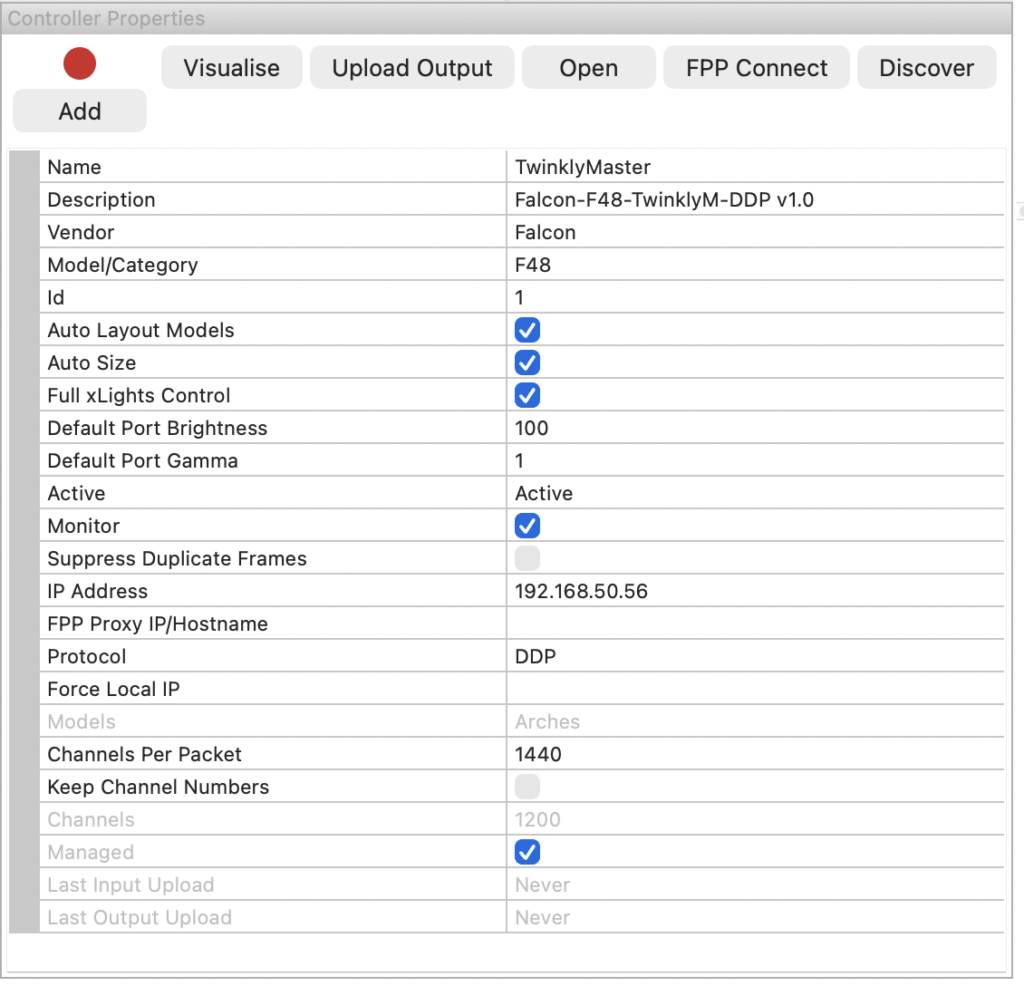
Instead of xLights communicating directly with each Twinkly controller, xLights sends standard DDP (preferred), E1.31 or Art-Net data to Twinkly Master. Twinkly Master then translates that data into Twinkly’s proprietary network protocol and sends it to your lights.
Think of it as a translator.
xLights
    ↓ DDP, E1.31 or Art-Net
Twinkly Master
    ↓
Twinkly Controllers
    ↓
Twinkly Lights
Because it uses “standard” lighting protocols (same as WS28XX lights), Twinkly Master makes your Twinkly lights appear much more like traditional pixel controllers. Twinkly Master will appear to xLights as a virtual Falcon F48 pixel controller to ensure maximum compatibility.
You can download Twinkly Master (Mac and Windows) here: https://lordorwell.wixsite.com/lights-of-elberfeld/software
What Does Native xLights Support Do?
Beginning with xLights 2022.10, xLights added native support for discovering and controlling Twinkly controllers directly. It can also import Twinkly’s 2D/3D mapping into custom models, making it possible to sequence organically-shaped props such as wrapped trees, bushes, wreaths, and garlands.
For many users, if you have no more than a handful of Twinkly controllers this is all that’s needed — the native implementation is usually the simplest solution.
Why Do People Still Use Twinkly Master?
Twinkly Master wasn’t made obsolete when xLights added native support. In fact, it still solves several problems that native support doesn’t.
1. Better Scalability
Each Twinkly controller is essentially a tiny Wi-Fi computer running proprietary software on an ESP32 board.
When you begin adding multiple trees, rooflines, garlands, curtains, etc, you may end up with 10–20 Twinkly controllers. Native xLights/FPP communicates with every controller individually. Twinkly Master centralizes that communication, which often reduces network overhead and simplifies large installations.
For Twinkly WiFi issues, see our guide on WiFi Troubleshooting.
2. Works With More Varieties of Twinkly Devices (Including Twinkly Pro)
Twinkly Master includes support for Twinkly Pro, as well as some Twinkly devices not supported by xLights.
3. Standard DDP / E1.31 / Art-Net Workflow
One of the biggest advantages is that Twinkly Master presents all of your Twinkly controllers as a single standard holiday lighting controller (Falcon F48). That means software besides xLights can drive your Twinkly lights, including any DDP / E1.31 / Art-Net compatible software. If you’ve already built that type of workflow, Twinkly Master fits naturally into it.
4. Easier Mixing with Traditional Controllers
Most large holiday displays already contain:
- Falcon / Kulp / Baldrick controllers
- WLED controllers
- FPP players
These all use standard lighting protocols like E1.31, DDP, or Art-Net. Twinkly Master lets your Twinkly lights participate in that same ecosystem instead of being treated as a special case.
5. Cross-Platform Flexibility
Because Twinkly Master communicates via DDP, E1.31 or Art-Net, you can separate responsibilities across multiple computers.
For example:
- Computer #1 runs FPP (Raspberry Pi) loaded with sequences created in xLights
- Computer #2 (Mac or PC) runs Twinkly Master — which looks like a single traditional Falcon lighting controller to xLights/FPP regardless of how many Twinkly devices you have
This can simplify networking on larger displays.
Advantages of Native xLights Support
Native support still has several major benefits.
It’s Free and Easy
No additional software is required. If you’re already using xLights, everything you need is built in.
Less Software to Manage
No additional application means:
- fewer updates
- fewer configuration files
- one less program to troubleshoot
For beginners, this is a major advantage.
Direct Discovery
xLights automatically discovers compatible Twinkly controllers on your network. No manual universe assignments are necessary for simple installations.
Import Twinkly’s 3D Mapping
One of the coolest features is importing Twinkly’s camera-generated layout directly into a custom xLights model. Twinkly Master can also do something similar and gives you better control over the Twinkly models — which can then be exported to xLights. This allows effects to follow the exact physical position of every LED on irregular objects such as bushes, trees, wreaths, etc.
If you’ve never tried it, check out our guide: How to Import 3D Twinkly Models into xLights
Feature Comparison
| Feature | Native xLights | Twinkly Master |
|---|---|---|
| Free | Yes | Yes |
| Setup Difficulty | Easy | Moderate |
| Uses DDP, E1.31, Art-Net | No | Yes |
| Supports other lighting software | Limited | Yes |
| Best for large installations | Good | Excellent |
| Framerate limiter | No | Can limit frames sent to Twinkly devices to help fix “stuttering” |
| Additional software required | No | Yes |
| Additional computer required | No | Yes |
| Imports Twinkly mapping | Yes | Yes – more accurate |
Performance Considerations
For displays with only a few hundred pixels, you’ll likely notice little difference.
However, as displays grow larger, users often report smoother playback and easier management by centralizing Twinkly communications through Twinkly Master rather than having sequencing software manage every controller individually. Experiences vary depending on your network design, number of controllers, and whether they’re connected via Wi-Fi or Ethernet. I highly recommend that the computer that you run Twinkly Master on is connected via Ethernet cable directly to your dedicated gigabit switch rather than WiFi to minimize latency (see article on Network Optimization).
Which One Should You Choose?
Choose native xLights support if:
- You own only a few Twinkly sets.
- You’re new to xLights.
- You want the simplest possible setup.
- You only use xLights for sequencing.
Choose Twinkly Master if:
- You have many Twinkly controllers or want to use Twinkly Pro devices.
- You want to use the frame rate limiter in Twinkly Master.
- You want to use DDP, E1.31 or Art-Net.
- You use software besides xLights.
- You’re integrating Twinkly into a larger professional-style display.
- You prefer a standardized network architecture.
Can You Switch Later?
Absolutely.
Many hobbyists start with native xLights support because it’s quick and easy. As their displays expand, they transition to Twinkly Master to gain additional flexibility and better integration with other lighting hardware.
The good news is that your xLights sequences generally don’t need to change significantly—the method used to deliver data to the lights changes, not the effects you’ve created.
Final Thoughts
Native Twinkly support in xLights has become remarkably capable and is the best starting point for most homeowners. It offers direct controller discovery, imports Twinkly’s unique mapped layouts, and requires no extra software, making it an excellent choice for small to medium-sized displays.
Twinkly Master, however, still shines for advanced users. By translating DDP, E1.31 or Art-Net into Twinkly’s proprietary protocol, it integrates Twinkly lights into the same workflow used by professional pixel controllers and other lighting software. If your display is growing in size or complexity, or you want maximum flexibility, it’s worth considering.
For many decorators, the decision isn’t about which tool is “better”—it’s about choosing the one that best matches the size of your display today while leaving room to grow tomorrow.