
How to Build a DIY RGB Light Tunnel
Imagine walking through a tunnel of animated Christmas lights, with colors chasing overhead, patterns flowing down the sides, and music-synchronized effects surrounding you.
An RGB light tunnel is a fantastic addition to a residential Christmas light show. Unlike traditional static decorations, a pixel-based tunnel can display thousands of colors, animations, and effects that synchronize with your other props and music.
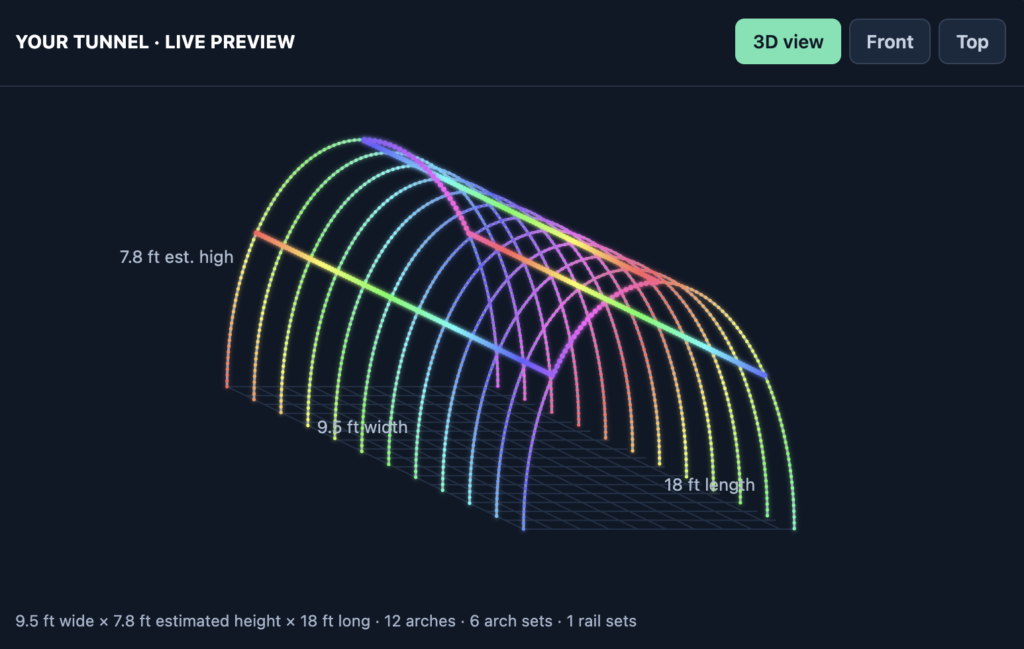
The good news? You don’t need an elaborate metal framework or an expensive commercial installation to build one. With PVC pipe, addressable RGB pixels, a suitable controller, and some planning, you can build a tunnel for your own holiday display. See our Light Tunnel Calculator for help with planning!
This guide covers the design, construction, wiring, and programming of a DIY RGB light tunnel.
What Is an RGB Light Tunnel?
An RGB light tunnel is an arch-shaped or enclosed framework decorated with individually controllable RGB pixels. Visitors walk underneath or through the structure while animated lighting effects play across the frame.
Depending on your design, the tunnel can feature:
- Color chases: Colors travel along the arch or down the sides.
- Rainbow effects: A continuous rainbow moves through the tunnel.
- Spirals: Colors appear to twist around the structure.
- Music synchronization: Lighting effects change with the music playing in your Christmas light show.
- Themed sequences: Snowflakes, candy-cane stripes, holiday colors, and other effects.
- Interactive effects: With additional hardware and programming, you can create lighting sequences triggered by visitors.
The tunnel can be a standalone attraction or part of a larger RGB pixel display controlled by software such as xLights and Falcon Player (FPP).
One of the biggest advantages of a pixel tunnel is that the same physical lights can produce an almost unlimited variety of effects. You aren’t locked into a single color or pattern.
Plan Your Light Tunnel Design
Before buying materials, decide how large your tunnel should be, where it will be installed, and how visitors will interact with it.
Choose your dimensions
Three dimensions matter most:
- Length: How far the tunnel extends along the walkway.
- Width: The distance between the two sides of the arch.
- Height: The clearance beneath the top of the arch.
A longer tunnel creates a more immersive experience, but it also requires more framing, pixels, wiring, and power.
For a residential display, a relatively short tunnel can still produce an impressive effect. You can always extend it in the future.
Important: Measure the actual clearance of your assembled structure rather than relying on the nominal dimensions of the pipe or arch.
Decide how the tunnel will be supported
There are several ways to construct the frame:
PVC arches
PVC is inexpensive, lightweight, and easy to work with. It is a practical option for a seasonal residential display, especially when you want a structure that can be disassembled for storage.
Metal conduit or tubing
Metal can provide a more rigid structure, but fabrication, connections, and mounting may require more work.
Modular frames
A frame built in sections can be easier to transport and store. However, every joint becomes a potential weak point, so connections need to be designed to handle the loads imposed by the assembled structure.
For a first DIY project, PVC is worth considering because it is accessible and relatively easy to modify.
Materials and Tools
The exact materials depend on the dimensions of your tunnel and how you plan to mount the pixels.
Here is a starting point for a PVC-based design.
Frame materials
| Material | Purpose |
|---|---|
| PVC pipe | Forms the arches and connecting sections |
| PVC fittings or suitable mechanical connectors | Joins frame sections where needed |
| Ground stakes | Secure the frame to the ground |
| Zip ties or suitable pixel-mounting hardware (often 3D printed clips) | Attach pixel strings to the frame |
| Measuring tape | Establishes dimensions and spacing |
| Marker | Marks cutting and assembly locations |
You may also need PVC cutters or a saw, depending on the pipe you choose.
Lighting and control equipment
| Component | Purpose |
|---|---|
| Addressable RGB pixels | Create the lighting effects |
| Pixel controller | Sends data to the pixels |
| Power supply | Provides the required DC power |
| Appropriate wiring and connectors | Distribute power and data |
| Ethernet cable or Wi-Fi connection | Connects the controller to your show network, depending on the equipment |
| Show player | Plays the programmed sequences |
| xLights software | Designs and sequences the lighting effects |
Your existing Christmas light show equipment may already cover several of these requirements.
For example, a tunnel can be added to an existing xLights and FPP setup rather than requiring a separate show player.
See our guides to xLights and Falcon Player (FPP) for more information.
Building the PVC Frame
The frame is the foundation of your light tunnel. It needs to maintain its shape, support the lights, and remain stable in the conditions where it will be used.
Step 1: Determine the arch dimensions
Start by deciding the desired width and clearance beneath the arch.
PVC arches are often made by bending a continuous length of pipe or by joining shorter sections. The best approach depends on the pipe, the desired shape, and the dimensions of the tunnel.
If you use multiple sections, remember that the overall dimensions will depend on how the assembled pipe behaves. Don’t assume that the length of the pipe alone tells you the finished height.
For example, my own tunnel uses a PVC arch assembled from four sections 5 feet long each. Although the total pipe length is 20 feet (cut from two 10 foot sticks of 1/2 inch schedule 40 PVC), the assembled arch has an actual height of approximately 7 feet 8 inches. I experimented with using shorter sections of PVC (around 17 feet total) because I originally wanted a narrower tunnel, but the turning radius made it difficult to keep the connectors together, plus the tunnel wasn’t as tall as I preferred.
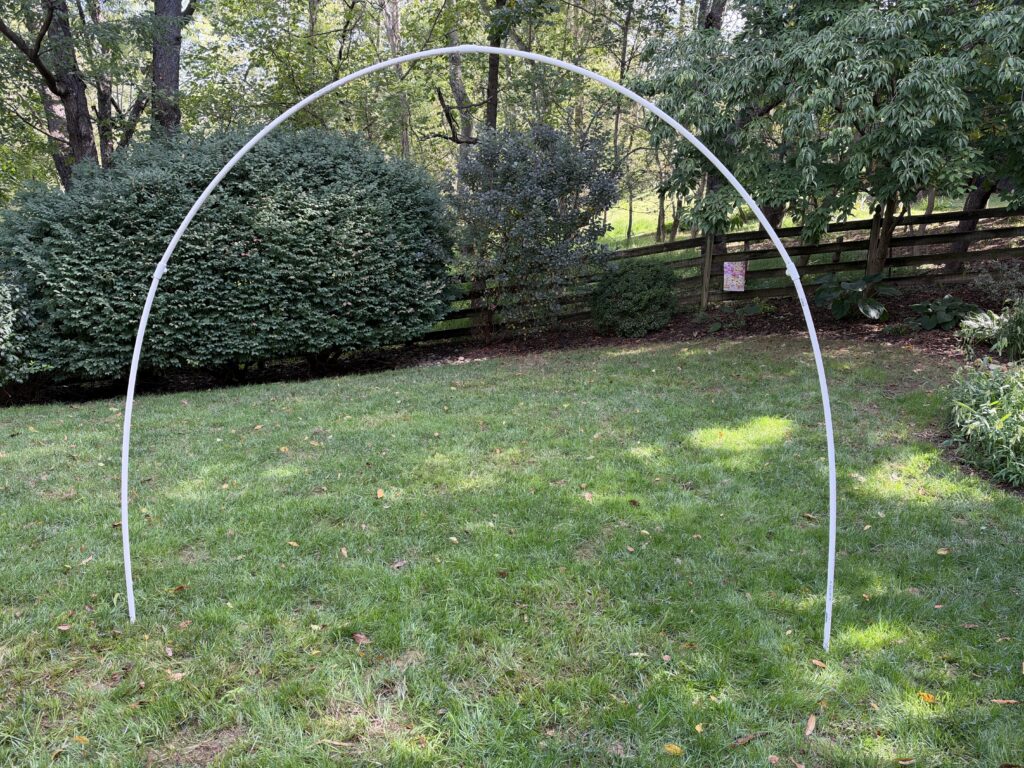
Measure the assembled arch before finalizing your design.
Step 2: Assemble the arches
Construct the arches on a flat surface if possible.
PRO TIP: If using PVC for your frame, invest in a ratcheting PVC cutter instead of trying to use a saw to cut the PVC — it is quicker, easier and doesn’t create a cloud of PVC dust!
Check that:
- Both sides of the arch have the intended shape.
- The bottom ends are positioned correctly.
- Joints fit securely.
- The frame can be assembled and disassembled as planned.
- The finished structure provides adequate clearance.
If you are building multiple arches, use the first one as a template for the others.
Consistent dimensions will make it easier to install the connecting sections and keep the finished tunnel aligned.
Step 3: Connect the arches
If the tunnel uses multiple arches, connect them with longitudinal supports running along its length.
These supports help maintain the spacing between arches and give you additional locations for attaching pixels.
The number and placement of supports depend on your design. Consider how much weight the frame must carry and how the structure may respond to wind.
Avoid assuming that a lightweight PVC frame will remain stable simply because it holds its shape during assembly.
Step 4: Anchor the structure
Anchoring is one of the most important parts of the build.
A tunnel presents a relatively large surface area to the wind. The lights themselves may weigh very little, but the entire structure can still move or overturn if it isn’t adequately secured.
Ground stakes are one option for outdoor installations.
For my tunnel, I have used 1/2-inch rebar stakes with a PVC frame made from 1/2-inch schedule 40 pipe. The appropriate stake size and length depend on the ground conditions, frame design, and how the stakes connect to the structure. I have very hard/dense clay soil in my yard, so rebar stakes are my go-to anchors for many props, including the tunnel — these might not be safe or appropriate in sandy or other type of soil, so please adjust based on your situation!
When planning your anchors, consider:
- Soil type and firmness.
- The depth of the stakes.
- How the frame attaches to the stakes.
- The possibility of wind gusts.
- Whether the structure can be safely removed before severe weather.
Do not assume that a particular stake length is sufficient for every installation.
Also, do not rely on PVC cement or friction alone to secure an outdoor structure against wind loads. The complete assembly, including its joints and anchors, must be suitable for the conditions.
If the tunnel will be installed where people gather, take extra care to prevent tipping, tripping hazards, and exposed sharp edges.
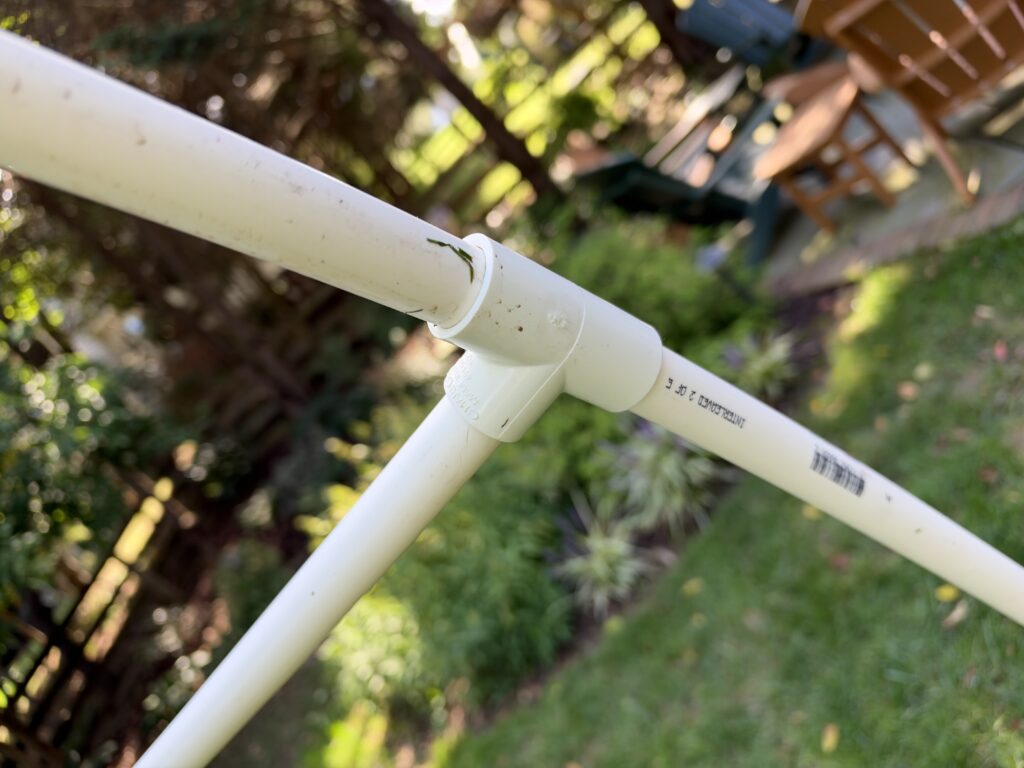
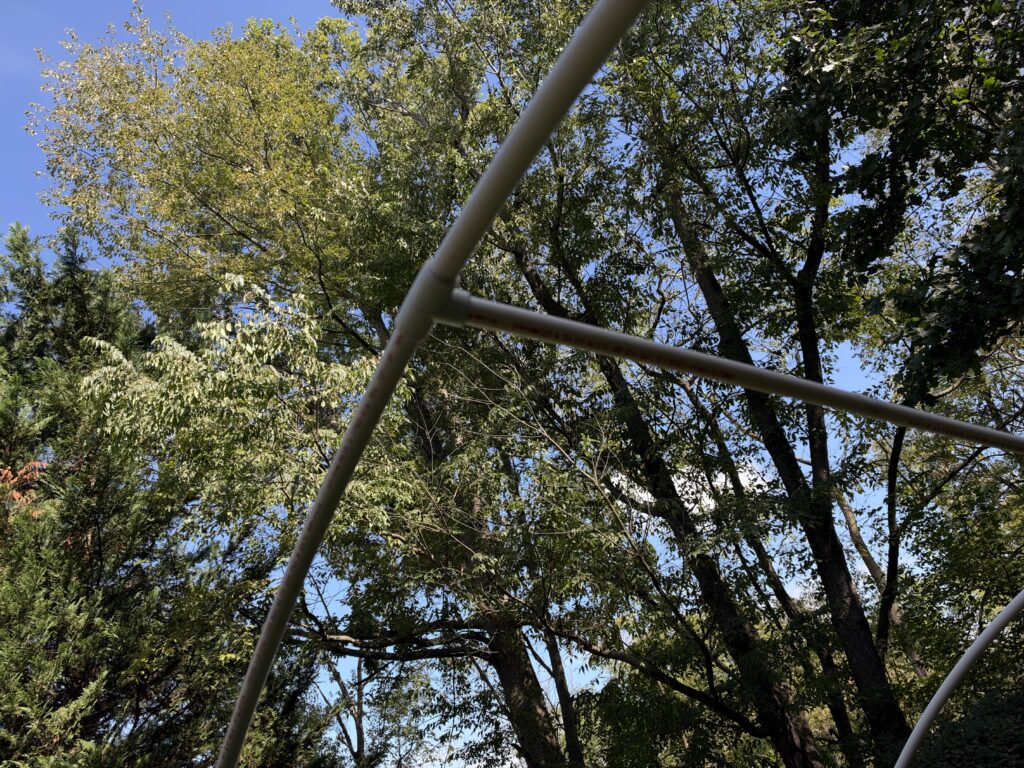
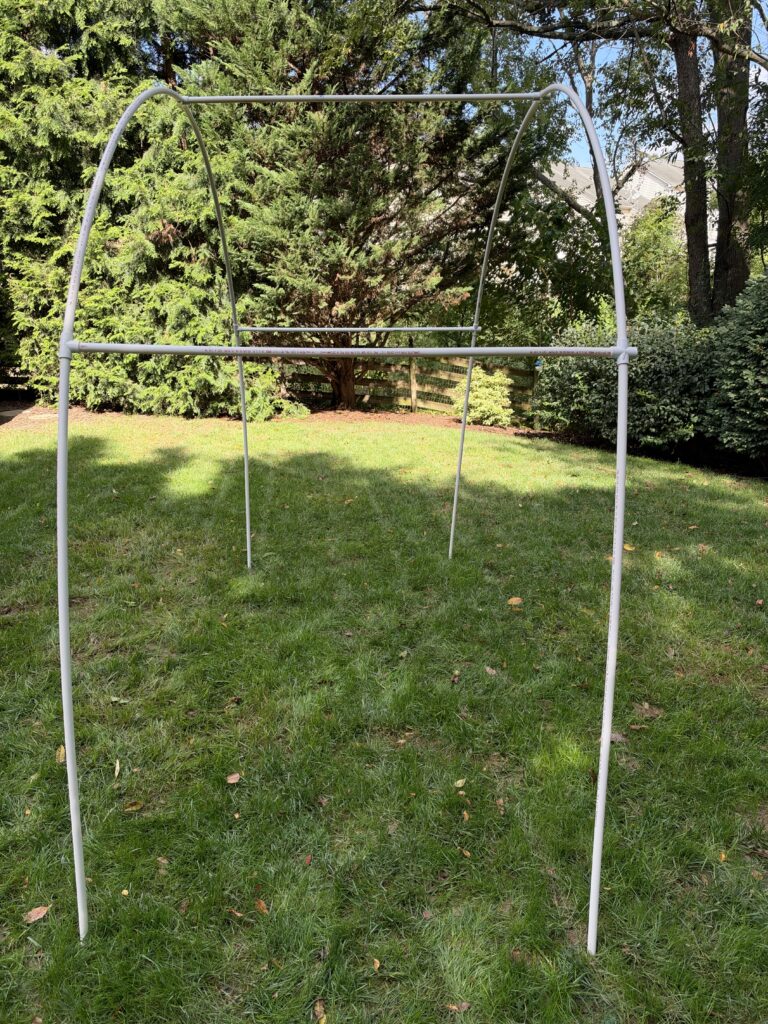
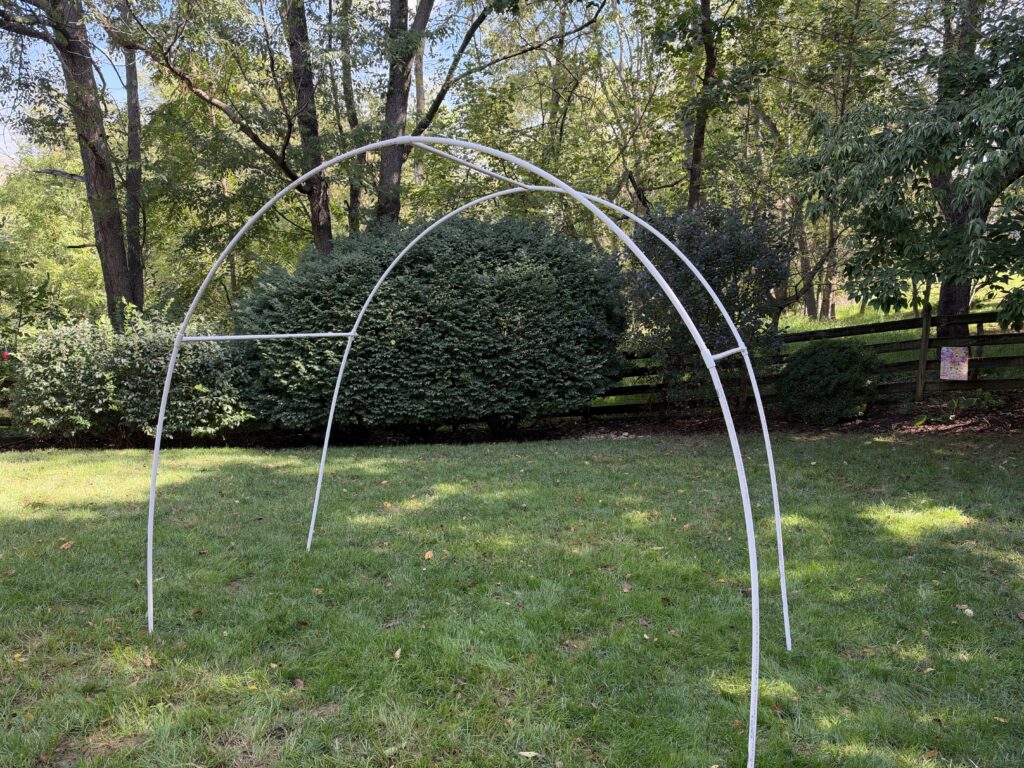
The ends of the PVC arches have been slid over 24 inch long 1/2 inch diameter pieces of rebar driven into the ground
Choosing RGB Pixels for Your Tunnel
Once the frame is complete, it’s time to decide how to light it.
For a programmable tunnel, addressable RGB pixels are generally the most versatile choice.
Each pixel can display a color independently of the others, allowing you to create moving patterns rather than simply changing the color of an entire string.
Twinkly HD versus Bullet pixels versus seed pixels
Common options are Twinkly HD Strings, bullet-style pixels and seed pixels.
None of the choices is universally better. See table below for comparison. You will need to decide what’s best for you based on your current lighting ecosystem and aesthetic preferences.
| Feature | Twinkly HD Strings | Bullet pixels | Seed pixels |
|---|---|---|---|
| Appearance | Smaller individual pixel housings (5 mm diameter); ~2.16 inch bulb spacing | Larger individual pixel housings (12 mm diameter); usually 4 inch spacing, but other options available | Small, compact light nodes (size varies); many spacing options (1 inch, 2 inch, 4 inch, etc) |
| Visibility during the day | Less noticeable | Often more noticeable | Generally flatter and less visually prominent |
| Mounting | Zip ties or 3D printed clips | Zip ties or 3D printed clips | Zip ties or 3D printed clips |
| Visual effect | Defined individual points of light; Twinkly HD strings are RGB+W, so better whites than typical WS2811 bullet or seed pixels | Defined and larger individual points of light | A finer, potentially more continuous-looking pattern |
| Standalone capability | Yes — can load lighting effects directly onto Twinkly controllers for standalone operation (no network) | Maybe – depends on controller chosen | Maybe – depends on controller chosen |
| Controller requirements | Twinkly WiFi controller included with each string; must have strong WiFi network | Requires WS28XX controller (e.g. Falcon, Kulp) | Requires WS28XX controller (e.g. Falcon, Kulp) |
| Power requirements | 24 volt, 36 watt power supply included with each string; no power injection needed | Generally 12 volt power supplies as part of controller build; may require power injection | Generally 12 volt power supplies as part of controller build; seed pixels use less power |
| Storage Off Season | Very compact and light; easiest storage option when factoring controller size and weight | Largest, heaviest option | Smallest, lightest option for lights only |
How many pixels do you need?
The total number depends on the number of arches, the length of each arch, the spacing between pixels, and whether you add lights along the sides and top of the tunnel.
For a simple starting estimate:
Pixels per run = Run length ÷ Pixel spacing
Make sure the run length and spacing use the same units.
For example, if a straight section is 20 feet long and you want pixels approximately 2 inches apart:
- 20 feet = 240 inches.
- 240 inches ÷ 2 inches = 120 pixels.
That gives you approximately 120 pixel intervals along the section. The exact number of pixels will depend on whether you place a pixel at each endpoint and how the run is mounted.
For an arch, measure the length along the curved pipe rather than using only the width of the tunnel.
Repeat the calculation for each run and add the results together to estimate the total pixel count.
How should you attach the pixels?
The mounting method depends on the type of pixels you use.
Zip ties are a simple option for prototypes and seasonal installations. Purpose-built pixel mounting hardware can make spacing more consistent and simplify installation.
Whichever method you choose:
- Keep the spacing consistent.
- Avoid crushing pixel wires with tight ties.
- Leave enough flexibility for assembly and disassembly.
- Make sure the pixels cannot easily fall into the walking path.
- Keep connectors and wiring away from places where people may trip.
Before attaching thousands of lights, test a small section of the frame to make sure you like the spacing and appearance.
Power and Wiring
A tunnel with individually addressable pixels needs both power and data.
The controller sends data to the pixels, while a power supply provides the electrical energy needed to illuminate them.
These are related but separate requirements.
Calculate the power requirements
The power requirement depends on the number and type of pixels, their rated voltage, and how brightly you intend to operate them.
Don’t calculate power using pixel count alone.
For an initial estimate, use the manufacturer’s maximum power specification for your particular pixels. Then determine the expected current and whether the power supplies, wiring, connectors, and controller outputs are suitable for the design.
For a DC system:
Watts = Volts × Amps
For example, a 12V system drawing 10A uses 120W of DC power.
That example is illustrative, not a recommendation for your tunnel.
Actual power requirements will depend on the specific pixels and operating conditions.
Plan for voltage drop
Voltage drop becomes important when power travels through long lengths of wire or through large numbers of pixels.
Symptoms of inadequate power distribution can include:
- Pixels changing color toward the end of a run.
- Dimming at the far end.
- Unreliable operation under heavy load.
The appropriate solution may involve additional power injection points, shorter power runs, or different wire sizes.
Follow the pixel manufacturer’s recommendations and calculate the expected current through each wire and connector.
Never assume that the controller’s data connection also supplies sufficient power to all the pixels.
Do you need power injection?
Possibly.
Some short, low-power runs may operate correctly with power supplied at one end. Longer runs or higher-current installations may need power supplied at multiple points.
The answer depends on the pixel specifications, wiring, and actual current draw.
Plan your power distribution before attaching the lights permanently. It’s much easier to accommodate additional wiring during construction than after the tunnel is assembled.
Outdoor electrical safety
Outdoor Christmas lighting needs suitable weather protection.
Use power supplies, enclosures, connectors, and cables appropriate for their installation environment.
Keep mains-voltage equipment protected from moisture, provide appropriate overcurrent protection, and follow applicable electrical codes.
Use a qualified electrician when the installation requires electrical work beyond your experience.
Choosing a Pixel Controller
The controller determines how the tunnel receives and displays its lighting sequences.
If you already operate an xLights-based Christmas display, adding a tunnel may be straightforward.
Common approaches include:
- Adding the tunnel to an existing pixel controller with sufficient capacity.
- Using a dedicated controller for the tunnel.
- Incorporating the tunnel into a larger network of props controlled by multiple controllers.
The right choice depends on the number of pixels, available outputs, data requirements, and how your show is organized.
Integrating with xLights and FPP
xLights is used to design lighting effects and synchronize them with music.
Falcon Player (FPP) can play the sequences and distribute the lighting data to compatible controllers.
A typical setup looks like this:
- Design the tunnel model in xLights.
- Assign the pixels to the appropriate controller outputs.
- Create lighting effects for the tunnel.
- Export the sequence and configuration as required by your workflow.
- Configure FPP and the controller to use the correct outputs and data protocols.
- Test the tunnel independently before integrating it into the full show.
Your exact configuration will depend on the controller and network architecture.
If you already have an FPP player and xLights show, the tunnel can become another prop in your existing display.
For more information, see:
Programming Your Tunnel in xLights
The real fun begins when the tunnel is connected to your show software.
Because the tunnel is made from addressable pixels, you can create effects that move through the structure in different directions.
Create the tunnel model
In xLights, create a model representing the tunnel’s physical layout.
Depending on how your pixels are arranged, you might model each arch separately or organize the entire tunnel into a larger structure.
The goal is to make the software’s representation match the physical pixel layout as closely as practical.
Pay attention to:
- The number of pixels in each run.
- The direction in which the pixels are wired.
- The order of the arches.
- The orientation of the model.
- The relationship between the physical layout and the sequence preview.
Correct modeling makes it much easier to create effects that move in the intended direction.
Try these lighting effects
1. Rainbow chase
Run a rainbow through the tunnel from entrance to exit. This is an excellent way to demonstrate the movement of color across the structure.
2. Candy-cane stripes
Alternate red and white patterns across the arches to create a classic Christmas look.
3. Spiral effect
Create the illusion of a spiral wrapping around the tunnel. The result can be especially effective when the pixel layout supports movement across multiple arches.
4. Color waves
Send waves of color through the tunnel in time with the music.
5. Snowstorm
Use white and blue effects to simulate falling snow or icy movement.
6. Music-synchronized effects
Use different effects for different sections of a song, building from slower patterns to faster chases during energetic passages.
You don’t need to use every effect in every sequence. A few well-designed patterns can be more effective than constantly changing colors.
Test the effects in person
The preview window in xLights is useful, but it cannot completely reproduce the experience of standing inside a real tunnel.
Test your effects at night.
Look for uneven brightness, unexpected gaps, reversed directions, and patterns that don’t move the way you intended.
A simple test sequence with solid colors and basic chases can help you verify the wiring before you begin detailed programming.
Suggested photo: A screenshot of the tunnel model in xLights alongside a photograph of the corresponding physical installation.
Installation Tips and Lessons Learned
A little planning can save a lot of work when installing a seasonal structure.
Here are some practical considerations.
Build for easy storage
A tunnel that looks great in December but is difficult to dismantle in January can become a chore.
Consider designing the frame in manageable sections.
Label the sections and electrical connections so you can reproduce the same configuration the following year.
If the pixel strings remain attached to the arches during storage, protect them from crushing, tangling, and excessive bending.
Test before final assembly
Test the controller, pixels, and power distribution before installing the complete structure.
This makes it easier to identify problems without climbing around an assembled tunnel.
A sensible testing order is:
- Test a short pixel run.
- Test each complete run.
- Test the controller outputs.
- Check the power distribution.
- Assemble the tunnel and test the full sequence.
Pay attention to clearance
An arch that looks tall enough when viewed from a distance may provide less clearance than expected.
Measure the finished structure at its lowest point, accounting for connectors, cross-supports, and any components that hang below the frame.
Consider the tallest intended visitors and whether the ground beneath the tunnel is level.
If people will walk through the tunnel, make sure they can do so without striking the frame or lights.
Plan for weather
PVC can be lightweight and convenient, but that doesn’t make the assembled structure immune to wind or other severe weather.
Inspect the tunnel before each use, especially after strong winds.
Check the joints, anchors, wiring, and mounting hardware. Take the structure down or secure it appropriately when conditions exceed what it was designed to withstand.
Keep wiring organized
Route wiring along the frame rather than across the walking path. Use suitable cable management to prevent connectors from pulling loose and wires from rubbing against sharp edges.
Allow enough slack at joints to accommodate assembly without placing tension on electrical connections.
Good cable management also makes troubleshooting much easier.
Is an RGB Light Tunnel Worth Building?
If you’re already invested in RGB pixels and a programmable Christmas light show, a tunnel can be a worthwhile addition. Unlike a traditional yard prop, a walk-through tunnel changes how visitors experience your display. They don’t just look at the lights from the street; they become surrounded by them.
A tunnel can also provide a new canvas for effects that are difficult to achieve with a flat outline or a conventional tree.
However, it does require more planning than simply adding another string of lights.
You’ll need to consider structural stability, anchoring, electrical distribution, weather protection, and safe pedestrian clearance.
For a first project, a relatively short tunnel with a straightforward pixel layout is a reasonable place to start. You can add more arches, more pixels, or more elaborate effects later.
The key is to build a structure that is safe, serviceable, and easy to maintain from one holiday season to the next.
FAQ
Should I try to DIY a tunnel or buy a pre-made setup?
You need to decide this for yourself, based on how comfortable you are with DIY projects and your ability to do this safely. If you want to spend the money, there are some great commercial solutions out there now that haven’t been available in the past.
How many pixels do I need for an RGB light tunnel?
It depends on the tunnel’s dimensions, the number of arches, and pixel spacing. Calculate the length of each pixel run, divide it by the desired spacing, and account for the placement of pixels at the endpoints. Add the counts for all runs to estimate the total. See our Light Tunnel Calculator for more information.
Do I need a dedicated controller for the tunnel?
No. You can have the same controller running both a Light Tunnel and other props at the same time. A dedicated controller or using a remote receiver setup from your main controller could make for cleaner wiring, but it’s not strictly necessary.
Where can I buy pre-made tunnel kits?
Take a look at our article on Props & Devices, which includes links for recommended vendors.
Can I build a light tunnel with ordinary PVC pipe?
PVC can be a practical frame material for a seasonal tunnel. The pipe diameter, wall thickness, arch geometry, joints, and anchoring all affect the finished structure’s strength and stability. Schedule 40 1/2 inch inner diameter PVC is a common choice. Choose materials appropriate for the dimensions and expected weather conditions.
Can I use my existing xLights setup?
Yes, provided your controller, network, and show player can accommodate the additional pixels and data requirements. You’ll need to create the tunnel model in xLights and configure the controller outputs and playback software accordingly.
Can the tunnel synchronize with music?
Yes. When integrated into a compatible xLights and FPP show, the tunnel can display effects that are timed to the music along with the rest of your Christmas display.
Can I leave my RGB light tunnel outside all winter?
That depends on the materials, electrical equipment, anchoring, and weather conditions. Use equipment rated for its environment, inspect the structure regularly, and take it down when weather conditions exceed its design limits.